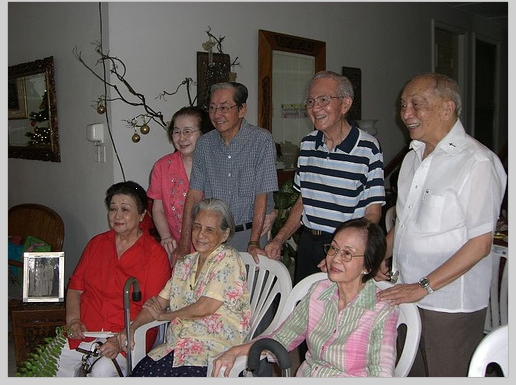
Dlibは,機械学習のアルゴリズムやトールの機能を持つソフトウエア.
Dlib の次の機能を使う
次の画像について顔検出を行うとする
顔検出が行われ,顔を囲むようなバウンディングボックス (bounding box) が表示される.
バウンディングボックスの座標値が数値データとして得られる
利用条件などは利用者において確認してください
サイト内の関連ページ
先人に感謝
dlib の Web ページ: http://dlib.net/
Python 3.7 を推奨したい(Python 3.8 は,2020年6月時点では,Dlib のインストールでの不具合の可能性がある)
Windows では「python」を使う,Ubuntu では「python3」を使う.
※ 「pip install ...」は,Python パッケージをインストールするための操作.
python -m pip install -U python -m pip install -U numpy scikit-image opencv-python
sudo apt update sudo apt -yV install python3-numpy python3-skimage python3-opencv
http://dlib.net/files/ を開き、 mmod_human_face_detector.dat.bz2をダウンロード
※ Windows での展開(解凍)のためのソフトには,「7-Zip」などがある.
※ C:\pytools\dlib が無いときは作る
C:\pytools\dlib\examples\faces の下の顔画像のファイルを確認する
※ Python プログラムを動かすために, Windows では,「python」コマンドを使う. Ubuntu では「python3」コマンドを使う.
開発環境や Python コンソール(Jupyter Qt Console,spyder,PyCharm,PyScripter など)も便利である.
cd C:\pytools\dlib\python_examples python cnn_face_detector.py mmod_human_face_detector.dat ..\examples\faces\2007_007763.jpg
結果が表示されるまで少し待つ
cd C:\pytools\dlib\python_examples python cnn_face_detector.py mmod_human_face_detector.dat ..\examples\faces\2008_001009.jpg
cd C:\pytools\dlib\python_examples python cnn_face_detector.py mmod_human_face_detector.dat ..\examples\faces\2008_001322.jpg
Dlib には Convolutional Network による顔検出の機能があり、顔検出させるためのプログラムは実質2行. 画面を開く、画像ファイルを読み込む、画像データを表示する、顔部分を四角で描くといったことも簡単なコマンド.
※ 「pip install ...」は,Python パッケージをインストールするための操作
python -m pip install -U python -m pip install -U opencv-python scikit-image
Python プログラムを動かす.
※ Python プログラムを動かすために, Windows では,「python」コマンドを使う. Ubuntu では「python3」コマンドを使う.
開発環境や Python コンソール(Jupyter Qt Console,spyder,PyCharm,PyScripter など)も便利である.
dlib に付属の「face_detector.py」を参考にして、次のプログラムを作成してみた. ファイルを作成するので,cd コマンドで,書き込み権限のあるディレクトリに移動してから実行すること.
import sys
import dlib
from skimage import io
import cv2
import numpy as np
def box_label(bgr, x1, y1, x2, y2, label):
cv2.rectangle(bgr, (x1, y1), (x2, y2), (255, 0, 0), 1, 1)
cv2.rectangle(bgr, (int(x1), int(y1-25)), (x2, y1), (255,255,255), -1)
cv2.putText(bgr, label, (x1, int(y1-5)), cv2.FONT_HERSHEY_COMPLEX, 0.7, (0,0,0), 1)
detector = dlib.get_frontal_face_detector()
v = cv2.VideoCapture(0)
while(v.isOpened()):
r, bgr = v.read()
if ( r == False ):
break
cv2.imwrite("hoge.png", bgr)
img = io.imread("hoge.png")
dets, scores, idx = detector.run(img, 1, -1)
for i, d in enumerate(dets):
box_label(bgr, d.left(), d.top(), d.right(), d.bottom(), 'face')
print(d)
cv2.imshow("", bgr)
if cv2.waitKey(1) & 0xFF == ord('q'):
cv2.destroyAllWindows()
break
※ 途中で止めたいとき,右上の「x」をクリックしない.画面の中をクリックしてから,「q」のキーを押して閉じる
本サイトは金子邦彦研究室のWebページです.サイトマップは,サイトマップのページをご覧下さい. 本サイト内の検索は,サイト内検索のページをご利用下さい.
問い合わせ先: 金子邦彦(かねこ くにひこ) ![]()